但 API 按量付费,token 烧得飞起。Anthropic 官方数据,Claude Code 开发者平均每天花 6 美元,90% 的人每天在 12 美元以内。算下来一个月 100 到 200 美元,大约人民币 700 到 1400。
阿里云百炼的 Coding Plan 刚上新了GLM-5 和 MiniMax M2.5,目前支持 8 款国产顶级模型。国产模型的第一梯队,基本齐了。
划重点,固定月费,不按 token 计费,新用户首月 7.9 元。
关键是,这是阿里官方推荐的接入方式。完全不存在封号风险。阿里百炼Coding Plan 支持模型: Qwen3.5-Plus、Qwen3-Coder-Next,加上智谱的 GLM-5、MiniMax 的 M2.5、Kimi 的 K2.5,全在一个订阅里。
登录地址:https://bailian.console.aliyun.com/cn-beijing/?tab=model#/efm/coding_plan
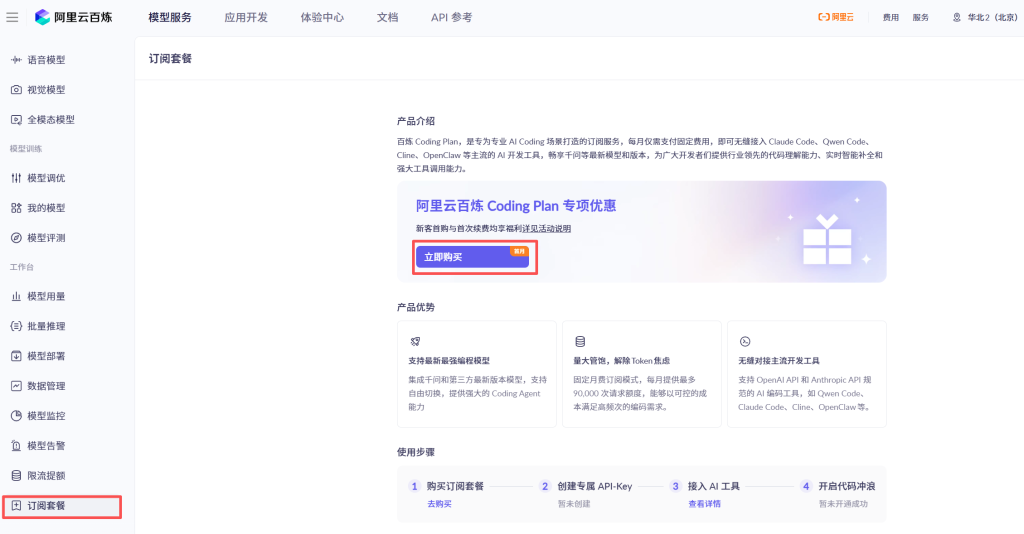
获取专属API KEY

OpenClaw 接入
运行 openclaw dashboard 打开 Web 控制台,左侧菜单选 Config > Raw。
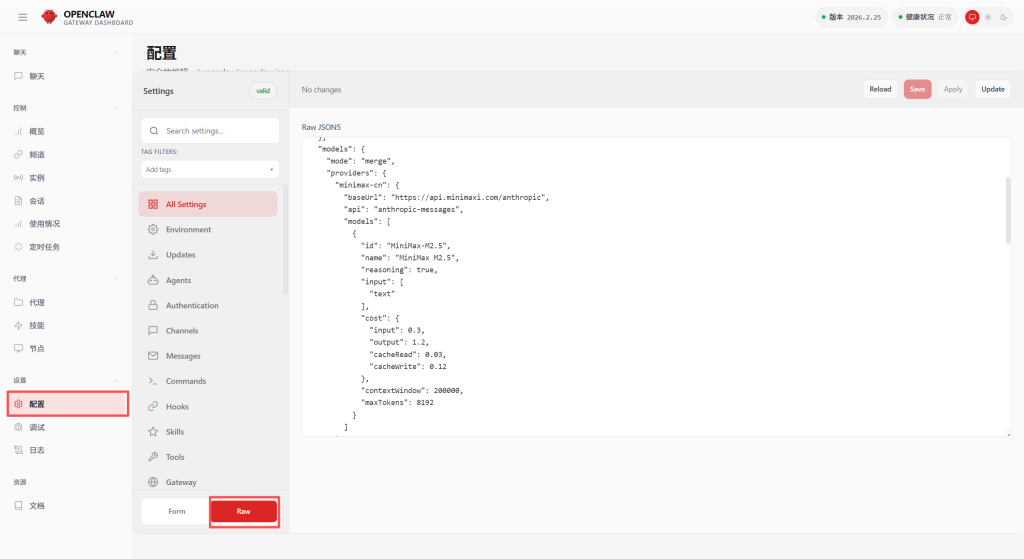
在 JSON 根对象中加入以下 models 配置,已存在就替换。YOUR_API_KEY 换成你的 Coding Plan Key。
  "models": {
    "mode": "merge",
    "providers": {
      "bailian": {
        "baseUrl": "https://coding.dashscope.aliyuncs.com/v1",
        "apiKey": "YOUR_API_KEY",
        "api": "openai-completions",
        "models": [
          {
            "id": "qwen3.5-plus",
            "name": "qwen3.5-plus",
            "reasoning": false,
            "input": ["text", "image"],
            "cost": {
              "input": 0,
              "output": 0,
              "cacheRead": 0,
              "cacheWrite": 0
            },
            "contextWindow": 1000000,
            "maxTokens": 65536
          },
          {
            "id": "qwen3-max-2026-01-23",
            "name": "qwen3-max-2026-01-23",
            "reasoning": false,
            "input": ["text"],
            "cost": {
              "input": 0,
              "output": 0,
              "cacheRead": 0,
              "cacheWrite": 0
            },
            "contextWindow": 262144,
            "maxTokens": 65536
          },
          {
            "id": "qwen3-coder-next",
            "name": "qwen3-coder-next",
            "reasoning": false,
            "input": ["text"],
            "cost": {
              "input": 0,
              "output": 0,
              "cacheRead": 0,
              "cacheWrite": 0
            },
            "contextWindow": 262144,
            "maxTokens": 65536
          },
          {
            "id": "qwen3-coder-plus",
            "name": "qwen3-coder-plus",
            "reasoning": false,
            "input": ["text"],
            "cost": {
              "input": 0,
              "output": 0,
              "cacheRead": 0,
              "cacheWrite": 0
            },
            "contextWindow": 1000000,
            "maxTokens": 65536
          },
          {
            "id": "MiniMax-M2.5",
            "name": "MiniMax-M2.5",
            "reasoning": false,
            "input": ["text"],
            "cost": {
              "input": 0,
              "output": 0,
              "cacheRead": 0,
              "cacheWrite": 0
            },
            "contextWindow": 1000000,
            "maxTokens": 65536
          },
          {
            "id": "glm-5",
            "name": "glm-5",
            "reasoning": false,
            "input": ["text"],
            "cost": {
              "input": 0,
              "output": 0,
              "cacheRead": 0,
              "cacheWrite": 0
            },
            "contextWindow": 202752,
            "maxTokens": 16384
          },
          {
            "id": "glm-4.7",
            "name": "glm-4.7",
            "reasoning": false,
            "input": ["text"],
            "cost": {
              "input": 0,
              "output": 0,
              "cacheRead": 0,
              "cacheWrite": 0
            },
            "contextWindow": 202752,
            "maxTokens": 16384
          },
          {
            "id": "kimi-k2.5",
            "name": "kimi-k2.5",
            "reasoning": false,
            "input": ["text", "image"],
            "cost": {
              "input": 0,
              "output": 0,
              "cacheRead": 0,
              "cacheWrite": 0
            },
            "contextWindow": 262144,
            "maxTokens": 32768
          }
        ]
      }
    }
  }
然后找到 agents.defaults 对象,替换或添加这两个字段。
  "model": {
    "primary": "bailian/qwen3.5-plus"
  },
  "models": {
    "bailian/qwen3.5-plus": {},
    "bailian/qwen3-max-2026-01-23": {},
    "bailian/qwen3-coder-next": {},
    "bailian/qwen3-coder-plus": {},
    "bailian/MiniMax-M2.5": {},
    "bailian/glm-5": {},
    "bailian/glm-4.7": {},
    "bailian/kimi-k2.5": {}
  }
第三步,保存并生效
点右上角 Save 再点 Update。
第四步,开始爽用
openclaw dashboard浏览器自动打开 http://127.0.0.1:18789,就可以跟你的「龙虾」对话了。
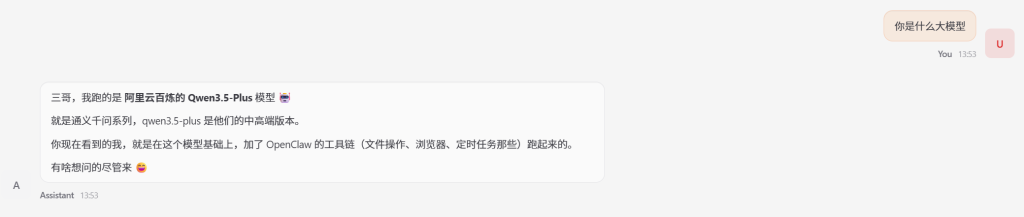
对话中切换模型:
/model glm-5停止正在运行的对话
/stop